Code
import PIL
import numpy as np
import matplotlib.pyplot as plt
import pandas as pd
import sklearnAs part of my ML practice, I was sent an ML challenge to develope a classifier that classfies pixels of hyperspectral images into various crops, which is an instance of a common problem known as crop mapping.
The satellite images in this instance are captured by the Sentinel-2 satellite.
Sentinel-2 is an earth observation mission by the European Space Agency.
The following is the challenge description:
You must implement a machine learning model to perform crop classification, and determine what crop types are grown where in an image of farm paddocks (also known as one-shot in-season crop classification).
Sentinel-2 is a satellite that captures 12 different wavelengths of light (also known as bands) in an image. These range from visible light (red, green, blue) to infra-red. The values for each band changes depending upon the material/object that is on the ground.
import PIL
import numpy as np
import matplotlib.pyplot as plt
import pandas as pd
import sklearndef load_image(path):
return np.array(PIL.Image.open(path))[:, :]bands = ['B01', 'B02', 'B03', 'B04', 'B05', 'B06', 'B07', 'B08', 'B8A', 'B09', 'B11', 'B12']After reading the problem description carefully, we start by loading the provided dataset
import matplotlib.pyplot as pltfrom sklearn.linear_model import LogisticRegression
from sklearn.ensemble import RandomForestClassifier
from sklearn.model_selection import train_test_splitfrom sklearn.metrics import confusion_matrix, accuracy_score, roc_curve, auc, ConfusionMatrixDisplayfrom imblearn.pipeline import make_pipeline as make_pipeline_with_sampler
from imblearn.under_sampling import RandomUnderSampler
from imblearn.over_sampling import SMOTEDATA_FILE = "DATA/pixels.csv"
data = pd.read_csv(DATA_FILE)data.info()<class 'pandas.core.frame.DataFrame'>
RangeIndex: 299894 entries, 0 to 299893
Data columns (total 15 columns):
# Column Non-Null Count Dtype
--- ------ -------------- -----
0 B01 299894 non-null float64
1 B02 299894 non-null float64
2 B03 299894 non-null float64
3 B04 299894 non-null float64
4 B05 299894 non-null float64
5 B06 299894 non-null float64
6 B07 299894 non-null float64
7 B08 299894 non-null float64
8 B8A 299894 non-null float64
9 B09 299894 non-null float64
10 B11 299894 non-null float64
11 B12 299894 non-null float64
12 label_id 299894 non-null int64
13 cloud_prob 299894 non-null float64
14 label 299894 non-null object
dtypes: float64(13), int64(1), object(1)
memory usage: 34.3+ MBNo null columns, thats good.
data['label_id'].unique()array([1, 0, 2], dtype=int64)There are 3 labels.
Let’s check the label counts.
data.groupby(['label','label_id']).size()label label_id
Cotton 2 11087
Other 0 275350
Sorghum 1 13457
dtype: int64labels2ids = {'Other' : 0 , 'Sorghum':1, 'Cotton':2}
ids2labels = {value:key for key,value in labels2ids.items()}The labels are imbalanced.
Let’s remove rows with cloud probability greater than 2 and check the counts again
data_no_clouds = data[data['cloud_prob']<=2]
"with clouds: " + str(len(data)), "without clouds: " + str(len(data_no_clouds))
('with clouds: 299894', 'without clouds: 297351')data_no_clouds.groupby(['label','label_id']).size()label label_id
Cotton 2 11087
Other 0 272879
Sorghum 1 13385
dtype: int64Let’s check the data ranges of features.
data_no_clouds.describe()| B01 | B02 | B03 | B04 | B05 | B06 | B07 | B08 | B8A | B09 | B11 | B12 | label_id | cloud_prob | |
|---|---|---|---|---|---|---|---|---|---|---|---|---|---|---|
| count | 297351.000000 | 297351.000000 | 297351.000000 | 297351.000000 | 297351.000000 | 297351.000000 | 297351.000000 | 297351.000000 | 297351.000000 | 297351.000000 | 297351.000000 | 297351.000000 | 297351.000000 | 297351.000000 |
| mean | 0.061849 | 0.076644 | 0.097624 | 0.109417 | 0.139290 | 0.193856 | 0.217530 | 0.226073 | 0.235409 | 0.249065 | 0.255259 | 0.204514 | 0.119586 | 0.041271 |
| std | 0.026723 | 0.029300 | 0.031394 | 0.046590 | 0.040789 | 0.060590 | 0.084279 | 0.085944 | 0.087007 | 0.095317 | 0.077941 | 0.085845 | 0.424096 | 0.234945 |
| min | 0.005600 | 0.005500 | 0.008900 | 0.007200 | 0.014600 | 0.036000 | 0.045900 | 0.044500 | 0.050200 | 0.044700 | 0.024500 | 0.019300 | 0.000000 | 0.000000 |
| 25% | 0.048600 | 0.061100 | 0.079700 | 0.080000 | 0.115600 | 0.157400 | 0.170000 | 0.177600 | 0.186900 | 0.189800 | 0.206000 | 0.135400 | 0.000000 | 0.000000 |
| 50% | 0.060800 | 0.074900 | 0.098000 | 0.105200 | 0.139900 | 0.188700 | 0.203800 | 0.213800 | 0.222500 | 0.225300 | 0.247500 | 0.210300 | 0.000000 | 0.000000 |
| 75% | 0.077300 | 0.096900 | 0.118000 | 0.147800 | 0.167300 | 0.231300 | 0.257900 | 0.266400 | 0.277400 | 0.293550 | 0.320500 | 0.283300 | 0.000000 | 0.000000 |
| max | 0.519100 | 0.460400 | 0.401200 | 0.570000 | 0.585900 | 0.573100 | 0.603300 | 0.617200 | 0.626500 | 1.002700 | 0.555100 | 0.532600 | 2.000000 | 2.000000 |
data_no_clouds[bands].hist(figsize=(5 , 35), bins=10, alpha=0.5, layout=(14,1))array([[<AxesSubplot:title={'center':'B01'}>],
[<AxesSubplot:title={'center':'B02'}>],
[<AxesSubplot:title={'center':'B03'}>],
[<AxesSubplot:title={'center':'B04'}>],
[<AxesSubplot:title={'center':'B05'}>],
[<AxesSubplot:title={'center':'B06'}>],
[<AxesSubplot:title={'center':'B07'}>],
[<AxesSubplot:title={'center':'B08'}>],
[<AxesSubplot:title={'center':'B8A'}>],
[<AxesSubplot:title={'center':'B09'}>],
[<AxesSubplot:title={'center':'B11'}>],
[<AxesSubplot:title={'center':'B12'}>],
[<AxesSubplot:>],
[<AxesSubplot:>]], dtype=object)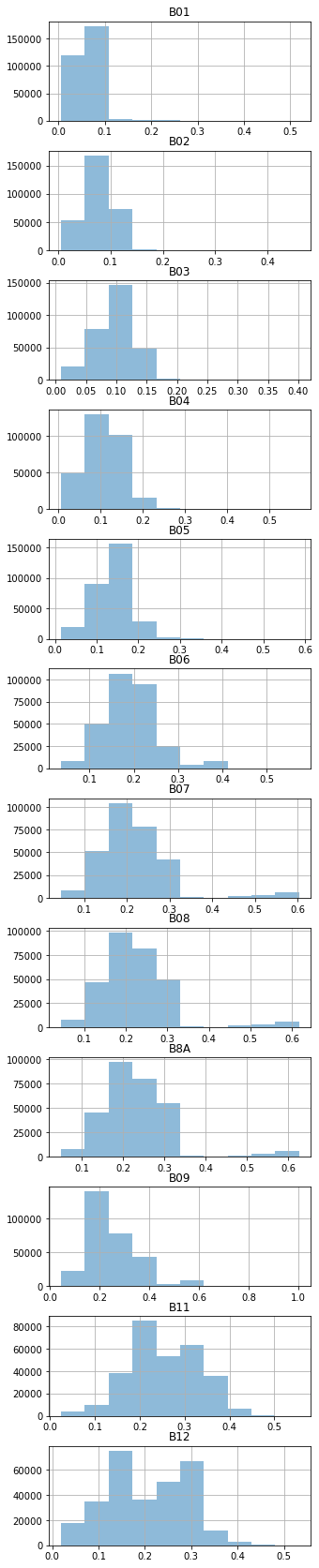
To plot the \(∓2σ\) standard deviations, we can plot box plots with the whiskers of the boxes at the \(∓2σ\) by setting the whiskers to the percentiles 2.28, 97.72 Source
def plot_means_and_stds(data):
  ax, bp = data[bands].boxplot(whis=[2.28, 97.72], vert=False, showmeans=True, figsize=(15,15), return_type="both")
  means = data[bands].mean(axis=0)
  stds = data[bands].std(axis=0)
  for i, line in enumerate(bp['medians']):
      x, y = line.get_xydata()[1]
      text = '-2σ={:.2f}, μ={:.2f}, +2σ={:.2f}'.format(means[i]-2*stds[i], means[i], means[i]+2*stds[i])
      ax.annotate(text, xy=(max(0, x-0.07), y+0.07))
ax.set_xlim(0, 1.1)data_other = data_no_clouds[data_no_clouds['label'] == 'Other']
plot_means_and_stds(data_other)
data_sorghum = data_no_clouds[data_no_clouds['label'] == 'Sorghum']
plot_means_and_stds(data_sorghum)
data_cotton = data_no_clouds[data_no_clouds['label'] == 'Cotton']
plot_means_and_stds(data_cotton)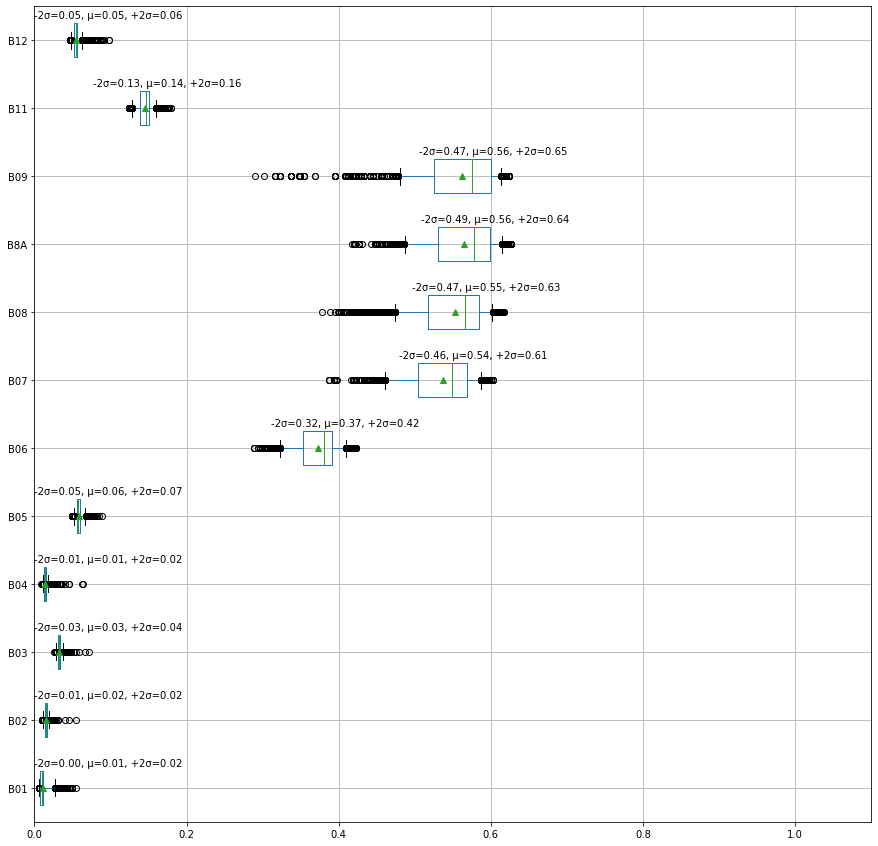
This figure is promising as the values in the bands B6-B9 seem to be distinguishing features for the cotton crop.
The first model I am going to try is the multiclass logistic regression for it’s simplicity to get an idea about the possible accuracy.
def train_test_assess(data, model):
    X = data[data.columns[~data.columns.isin(['label_id', 'label', 'cloud_prob'])]]
    y = data['label_id']
    labels = [ids2labels[id] for id in sorted(data['label_id'].unique().tolist())]
    X_train, X_test, y_train, y_test = train_test_split(X, y, test_size=0.3, random_state=0)
    model.fit(X_train, y_train)
    y_predicted = model.predict(X_test)
    print('Accuracy: {:.2f}%'.format(accuracy_score(y_predicted, y_test)*100 ))
    ConfusionMatrixDisplay.from_estimator(model, X_test, y_test, display_labels=labels)
    # if binary classification, report the AUC metric
    if len(labels) == 2:
        fpr, tpr, thresholds = roc_curve(y_test==1, y_predicted==1, pos_label=1)
        print('AUC: {:.2f}'.format(auc(fpr, tpr)))
return modelclf = LogisticRegression(max_iter=10000, multi_class='multinomial')
clf = train_test_assess(data_no_clouds, clf)Accuracy: 95.48%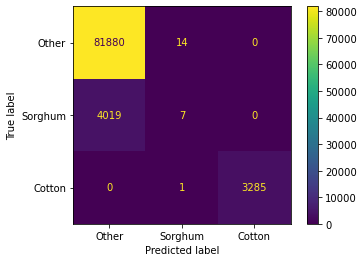
This initial result is consistent with our initial intuition, Cotton is easier classify than Other and Sorghum.
It might a good idea to search the literature at this point for discriminative features.
I’m going to attempt to try to focus on the Sorghum vs Other problem next.
data_bin = data_no_clouds[~data_no_clouds['label'].isin(['Cotton'])]data_bin['label'].value_counts()/data_bin.shape[0] * 100Other 95.324246
Sorghum 4.675754
Name: label, dtype: float64The data is highly imbalanced, as a first attempt to fix that, let’s try to add weights.
Next, we test the benefit of adding NDVI and NDWI indices
NDVI: The normalized difference vegetation index, an effective index for quantifying green vegetation.
NDWI: The normalized difference water index used to monitor changes related to water content in water bodies.
NDMI: The normalized difference moisture index used to monitor changes in water content of leaves.
For a full list of remote sensing indices https://custom-scripts.sentinel-hub.com/custom-scripts/sentinel-2/indexdb/
data_bin_aug = data_bin.copy()

# Calculate NDVI according to https://custom-scripts.sentinel-hub.com/custom-scripts/sentinel-2/ndvi/
data_bin_aug['NDVI'] = (data_bin['B08'] - data_bin['B04'])/(data_bin['B08'] + data_bin['B04'])
# Calculate NDWI according to https://custom-scripts.sentinel-hub.com/custom-scripts/sentinel-2/ndwi/
data_bin_aug['NDWI'] = (data_bin['B03'] - data_bin['B08'])/(data_bin['B03'] + data_bin['B08'])
# Calculate NDMI according to https://custom-scripts.sentinel-hub.com/custom-scripts/sentinel-2/ndmi/
data_bin_aug['NDMI'] = (data_bin['B08'] - data_bin['B11'])/(data_bin['B08'] + data_bin['B11'])
# Calculate NDMI according to https://custom-scripts.sentinel-hub.com/custom-scripts/sentinel-2/gndvi/#
data_bin_aug['GNDVI'] = (data_bin['B08'] - data_bin['B03'])/(data_bin['B08'] + data_bin['B03'])

# source : https://eprints.lancs.ac.uk/id/eprint/136586/2/Author_Accepted_Manuscript.pdf
data_bin_aug['GCVI'] = (data_bin['B8A'] / data_bin['B03']) - 1
data_bin_aug['SR'] = data_bin['B8A'] / data_bin['B04']
data_bin_aug['WDRVI'] = (0.2*data_bin['B8A'] - data_bin['B04'])/(0.2*data_bin['B8A'] + data_bin['B04'])To solve the data imbalance issue, let’s use resampling techinques.
First we are going to start by under-sampling, that is to randomly pick samples from the majority group such that the majority and minority classes become of the same size.
# Features importances
def calc_feats_importances(model, data):
    imps = list(model.feature_importances_/sum(model.feature_importances_) * 100)
    feats = data.columns[~data.columns.isin(['label_id', 'label', 'cloud_prob'])]
    feats_imps = dict(zip(feats, imps))
    return feats_imps
Undersampling
# Class count
print('Class distribution: \n'+str(data_bin['label'].value_counts()))

clf_bin5 = make_pipeline_with_sampler(
    RandomUnderSampler(),
    RandomForestClassifier(),
)

clf_bin5 = train_test_assess(data_bin_aug, clf_bin5)
calc_feats_importances(clf_bin5[1], data_bin_aug)
Class distribution:
Other 272879
Sorghum 13385
Name: label, dtype: int64
Accuracy: 93.74%
AUC: 0.96{'B01': 16.977792737026085,
'B02': 6.752882418570922,
'B03': 2.554969210163749,
'B04': 2.6563337118232186,
'B05': 3.3259631537606507,
'B06': 3.9223474314521467,
'B07': 3.8106562700819713,
'B08': 3.5390293533814705,
'B8A': 4.125422731372653,
'B09': 11.247041256299674,
'B11': 6.183133344698969,
'B12': 8.360377618059259,
'NDVI': 3.579062573810352,
'NDWI': 4.239217235594501,
'NDMI': 4.276727881317791,
'GNDVI': 4.767229788099875,
'GCVI': 3.348787865016853,
'SR': 3.351913622009852,
'WDRVI': 2.9811117974600068}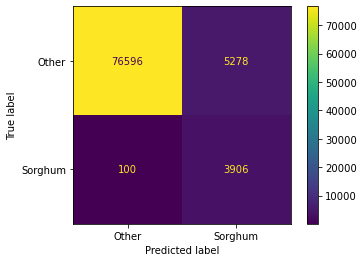
Since features B03, B04, B05, B07, B08 seem to have the least effect, let’s try removing them
# Class count
clf_bin6 = make_pipeline_with_sampler(
    RandomUnderSampler(),
    RandomForestClassifier(),
)
# remove the less important features
data_bin_imp = data_bin_aug.copy()
data_bin_imp = data_bin_imp[data_bin_imp.columns[~data_bin_imp.columns.isin(['B03', 'B04', 'B05', 'B07' ,'B08'])]]

clf_bin6 = train_test_assess(data_bin_imp, clf_bin6)
calc_feats_importances(clf_bin6[1], data_bin_imp)
Accuracy: 93.56%
AUC: 0.95{'B01': 18.12897209994457,
'B02': 7.237858677151985,
'B06': 6.580060537808315,
'B8A': 6.095497050380915,
'B09': 12.43070752907386,
'B11': 8.321135912566861,
'B12': 9.327024620656,
'NDVI': 4.785401272622748,
'NDWI': 4.975197715869764,
'NDMI': 5.109331237453354,
'GNDVI': 5.734742204540842,
'GCVI': 4.490255452417144,
'SR': 3.3861633080797793,
'WDRVI': 3.3976523814338675}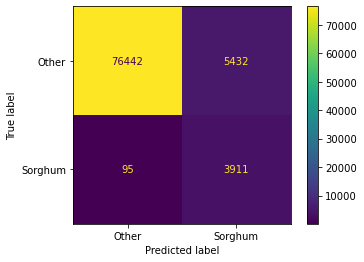
Next, I will test the accuracy on the full data (including Sorghum)
clf8 = make_pipeline_with_sampler(
    RandomUnderSampler(),
    RandomForestClassifier(),
)

clf8 = train_test_assess(data_no_clouds, clf8)
calc_feats_importances(clf8[1], data_no_clouds)
Accuracy: 94.46%{'B01': 9.6464853828485,
'B02': 9.714544169136957,
'B03': 2.7639361993439553,
'B04': 8.411027820590892,
'B05': 2.6418393007109287,
'B06': 4.068313242872104,
'B07': 12.051608284154835,
'B08': 18.782597265383384,
'B8A': 12.360924465779007,
'B09': 8.479810816147658,
'B11': 4.532715522991699,
'B12': 6.546197530040068}
I am going to pick the model with RandomDownSampler as it gives satisfactory results for the current data, the next step is a feature selection process.
X = data_bin_aug[data_bin_aug.columns[~data_bin_aug.columns.isin(['label_id', 'label', 'cloud_prob'])]]
y = data_bin_aug['label_id']# source: https://imbalanced-learn.org/stable/under_sampling.html
from collections import Counter
from imblearn.under_sampling import RandomUnderSampler
print(sorted(Counter(y).items()))
cc = RandomUnderSampler(random_state=0)
X_resampled, y_resampled = cc.fit_resample(X, y)
print(sorted(Counter(y_resampled).items()))
X_train, X_test, y_train, y_test = train_test_split(X_resampled, y_resampled, test_size=0.3)[(0, 272879), (1, 13385)]
[(0, 13385), (1, 13385)]Next, we perform feature selection to find the most important features.
# source: https://scikit-learn.org/stable/auto_examples/feature_selection/plot_rfe_with_cross_validation.html#sphx-glr-auto-examples-feature-selection-plot-rfe-with-cross-validation-py
import matplotlib.pyplot as plt
from sklearn.svm import SVC
from sklearn.model_selection import StratifiedKFold
from sklearn.feature_selection import RFECV

# Create the RFE object and compute a cross-validated score.
svc = RandomForestClassifier()

min_features_to_select = 1  # Minimum number of features to consider
rfecv = RFECV(
    estimator=svc,
    step=1,
    cv=StratifiedKFold(5),
    scoring="roc_auc",
    min_features_to_select=min_features_to_select,
)
rfecv.fit(X_train, y_train)

print("Optimal number of features : %d" % rfecv.n_features_)

# Plot number of features VS. cross-validation scores
plt.figure()
plt.xlabel("Number of features selected")
plt.ylabel("Cross validation score (accuracy)")
plt.plot(
    range(min_features_to_select, len(rfecv.grid_scores_) + min_features_to_select),
    rfecv.grid_scores_,
)
plt.show()
Optimal number of features : 2C:\Users\user\anaconda3\envs\ml-challenge-env\lib\site-packages\sklearn\utils\deprecation.py:103: FutureWarning: The `grid_scores_` attribute is deprecated in version 1.0 in favor of `cv_results_` and will be removed in version 1.2.
warnings.warn(msg, category=FutureWarning)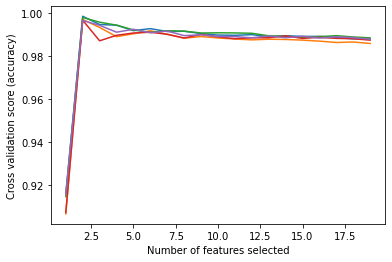
rfecv.get_feature_names_out()array(['B01', 'B09'], dtype=object)clf9 = make_pipeline_with_sampler(
RandomUnderSampler(random_state=0),
RandomForestClassifier(),
)
features = ['B01', 'B09']
clf9 = train_test_assess(data_no_clouds[features + ['label_id']], clf9)
calc_feats_importances(clf9[1], data_no_clouds[features])Accuracy: 97.59%{'B01': 50.180496359837235, 'B09': 49.819503640162765}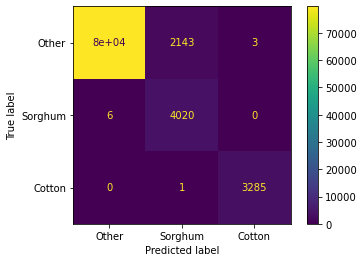
Now that we have trained a model, let’s try to apply it to the images provided
def load_images(paths, mask_path=None):

    df = pd.DataFrame()

    for path in paths:
        img = load_image(path)/10000
        img = img.flatten()
        df[path.split('.')[0].split('/')[1]] = img

    mask = load_image(mask_path)/255
    mask = np.mean(mask, -1)
    mask = mask.flatten() > 0
    df['mask'] = mask

return dfimgs = ['data/' + band +'.tif' for band in bands]
sat_imgs = load_images(imgs, mask_path='data/mask.png')def predict_label_image(model, images_df, bands, output_fname='predicted.png'):
# initialize pred_label column to 10 (a non valid label)
images_df.loc[:, 'pred_label'] = 10
# limit the prediction to the pixels where the mask is true
images_df.loc[images_df['mask'] == True, 'pred_label'] = model.predict(images_df.loc[images_df['mask'] == True, bands])
# create RGB predicted label image
images_df.loc[:,'R'] = 0
images_df.loc[:,'G'] = 0
images_df.loc[:,'B'] = 0
# when the predicted label is 0 (Other) set the value of pixel RED
images_df.loc[images_df['pred_label'] == 0, 'R'] = 255
# when the predicted label is 1 (Sorghum) set the value of pixel GREEN
images_df.loc[images_df['pred_label'] == 1, 'G'] = 255
# when the predicted label is 2 (Cotton) set the value of pixel BLUE
images_df.loc[images_df['pred_label'] == 2, 'B'] = 255
chans = ['R', 'G', 'B']
dims = (4000, 4000)
rgb_label = np.zeros(dims + (3, ), 'uint8')
for idx, chan in enumerate(chans):
img = images_df[chan].to_numpy()
rgb_label[..., idx] = img.reshape(dims)
img = PIL.Image.fromarray(rgb_label)
img.save(output_fname)
return rgb_labelfeatures = ['B01', 'B09']
rgb_label = predict_label_image(clf9, sat_imgs.loc[:, features + ['mask']], features)fig = plt.figure(figsize = (20,20))
ax = fig.add_subplot(1,1,1)
ax.imshow(rgb_label )